Custom Page Sizes for Google Docs™
The free Google Docs™ add-on for custom page dimensions, margins, and colors. 50+ presets for KDP, A4, Letter, and more.
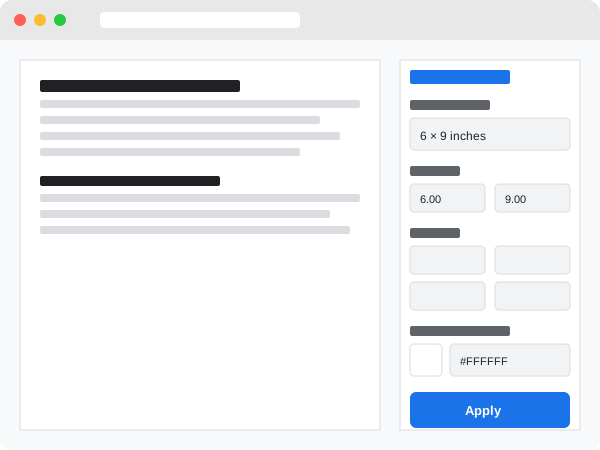
The free Google Docs™ add-on for custom page dimensions, margins, and colors. 50+ presets for KDP, A4, Letter, and more.
Standard page sizes don't work for everyone. Publishers, authors, and designers need more control.
Only Letter, A4, and a few standard sizes available
Can't set exact page sizes for publishing or printing
Can't change page background for creative documents
One add-on gives you complete control over page dimensions, margins, and colors.
Install FreeDocSize gives you professional-level control over your Google Docs™ formatting.
Set exact page width and height in inches, cm, mm, or points
Control top, bottom, left, and right margins separately
Choose any color with picker or hex code input
Amazon KDP, ISO A-series, US Letter, Legal, Photo sizes
Fit pages perfectly to your content length
Toggle orientation with one click
Switch units and values convert automatically
See your document's current values on open
Choose from 50+ professionally configured page sizes for publishing, printing, and design.
Get started in seconds. No configuration required.
Add DocSize from the Google Workspace™ Marketplace. It's free and takes seconds.
Access DocSize from the Extensions menu in any Google Doc.
Set your dimensions, margins, and colors, then click Apply. Done!
See how DocSize compares to paid alternatives.
| Feature | DocSize | Paid Alternatives |
|---|---|---|
| Custom dimensions | ✓ | ✓ |
| Presets library | ✓ (50+) | ✗ |
| Background colors | ✓ | ✓ |
| Unit conversion | ✓ | ✗ |
| Price | Free | $2–10/month |
Everything you need to know about DocSize.
With DocSize, changing page size is simple: Install the free add-on from the Google Workspace™ Marketplace, open any Google Doc, go to Extensions > DocSize, and set your desired width and height. You can choose from 50+ presets or enter custom dimensions in inches, cm, mm, or points.
Yes! DocSize includes presets for all common Amazon KDP book sizes including 6" x 9", 5" x 8", 5.5" x 8.5", 8.5" x 11", and many more. Simply select your desired KDP size from the presets dropdown and click Apply to instantly format your document for Kindle Direct Publishing.
Yes, DocSize is completely free with no hidden costs, subscriptions, or premium tiers. All features including custom dimensions, 50+ presets, background colors, and unit conversion are available to everyone at no charge.
Google Docs™ doesn't have A5 as a built-in option, but DocSize makes it easy. Install DocSize, open the sidebar from Extensions menu, select "A5" from the ISO A-Series presets (148 x 210 mm), and click Apply. Your document will instantly resize to A5 format.
Yes! DocSize includes a background color feature. Use the color picker to select any color, or enter a specific hex code for precise color matching. This is perfect for creating visually distinctive documents, colored letterheads, or creative projects.
DocSize only requires two permissions: document access (to modify page dimensions, margins, and background) and UI access (to display the sidebar). DocSize does NOT collect, store, or transmit any personal data. See our Privacy Policy for complete details.
DocSize lets you set independent margins for top, bottom, left, and right. Open DocSize from the Extensions menu, enter your desired margin values in your preferred unit (inches, cm, mm, or points), and click Apply. Unlike Google Docs™' built-in options, you have complete control over each margin.
Yes, DocSize works with both personal Google accounts and Google Workspace™ (formerly G Suite) accounts. Workspace administrators may need to approve the add-on for their organization before team members can install it.
Join thousands of writers, publishers, and professionals.
Install DocSize Free